
Overview
Our software uses FastSpring for payment processing (FastSpring is an authorized reseller). After a purchase or renewal, FastSpring sends a receipt email that includes a link to the invoice for your subscription. By default, the invoice PDF is not attached.
To enter this subscription invoice into the app, you would normally need to:
Open the receipt email
Click the invoice link
Download the invoice PDF
Upload it into the app
To simplify this process, you can configure to email the invoice PDF automatically.
Why Enable Invoice PDF Emails?
This feature is useful in two common situations:
1. Easier Forwarding of Subscription Invoices
When the subscription invoice PDF is emailed as an attachment, you can forward it directly into the app without downloading the file first.
2. When the Subscriber Is Not the Invoice Handler
In many organizations, the Subscriber (primary admin) is not the person who forwards subscription invoices into the app.
In this case, the Subscriber can:
Add Additional invoice recipients
Automatically send subscription invoice PDFs to accounting or finance users
Eliminate manual email forwarding
Who Can Configure This?
Only the Subscriber can manage subscription invoice email settings
Other users cannot change these settings
Additional invoice recipients must be added by the Subscriber
How to Enable Invoice PDF Email Delivery
Open the app and click on your company name is the top left hand corner
Go to Billing & Subscription
Click View Billing Account
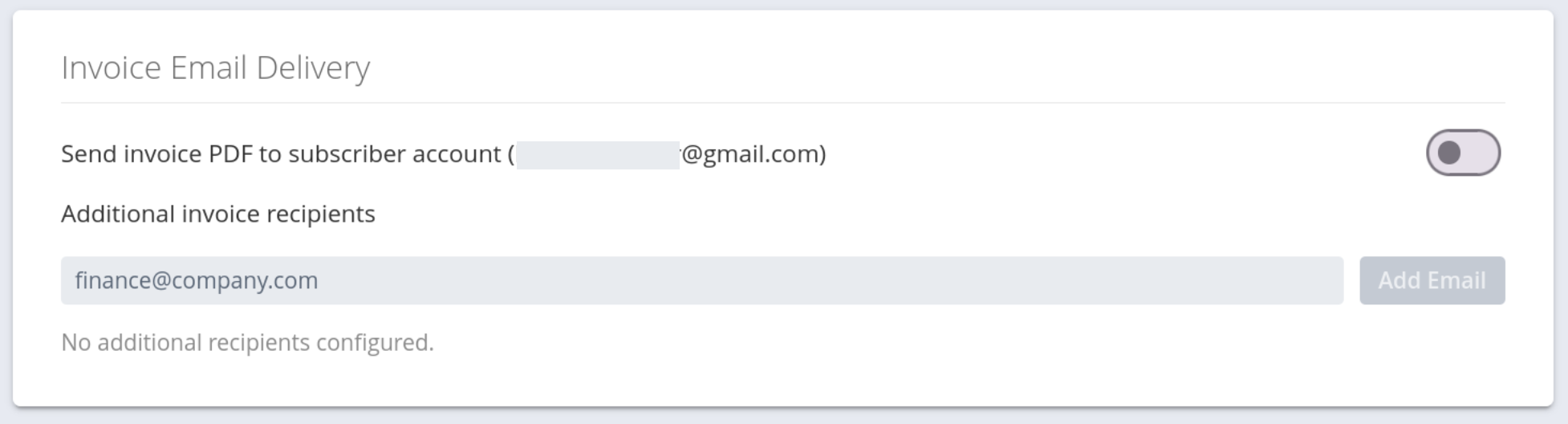
In Invoice Email Delivery:
Enable sending the subscription invoice PDF to the subscriber’s email
(Optional) Add email addresses under Additional invoice recipients
Subscription invoice PDFs will now be emailed automatically whenever an invoice is generated.
Why Don’t FastSpring Emails Include the Invoice PDF by Default?
FastSpring’s standard receipt emails include a link to the subscription invoice rather than a PDF attachment. This behavior is part of their email system and cannot be changed directly from the app.
The invoice email delivery option described above provides a simple way to receive the subscription invoice PDF as an attachment, making it easy to forward invoices into the app.
Summary
Subscription receipt emails include invoice links by default
Subscription invoice PDFs can be emailed automatically when enabled
Only the Subscriber can configure this
Additional recipients ensure subscription invoices reach the right people without manual forwarding